

Examples
Sync individual repos
Sync individual repos
Sync all repos in a organization
Sync all repos in a organization
Sync all repos owned by a user
Sync all repos owned by a user
Filter repos by topic
Filter repos by topic
Exclude repos from syncing
Exclude repos from syncing
Authenticating with GitHub
In order to index private repositories, you’ll need to authenticate with GitHub. Sourcebot supports the following mechanisms of authenticating a GitHub connection:GitHub App
GitHub App
only available in a paid plan. Please activate a license key to use this feature.
Register a new GitHub App
Register a new GitHub App and provide it with the following permissions:
- “Contents” repository permissions (read)
- “Metadata” repository permissions (read)
- “Members” organization permissions (read)
- “Email addresses” account permissions (read)
Install the GitHub App
Install the GitHub App into the GitHub orgs that you want Sourcebot to be aware of. Sourcebot will only be able to index repos from orgs with the GitHub App installed.
Create a private key for the GitHub App
Create a private key for the GitHub App.
Define the GitHub App config in Sourcebot
Create a new
apps object in the Sourcebot config file. The private key you created in the previous
step must be passed in as a token.Fine-grained personal access tokens
Fine-grained personal access tokens
Create PAT
Create a new fine-grained PAT here. Select the resource owner and the repositories that you want Sourcebot to have access to.Next, under “Repository permissions”, select permissions 
Contents and Metadata with access Read-only. The permissions should look like the following:Pass PAT into Sourcebot
Next, provide the PAT via a token which is referenced in the
token field in the connection config object.The most common mechanism of doing this is defining an environment variable that holds the PAT:Personal access tokens (classic)
Personal access tokens (classic)
Create PAT
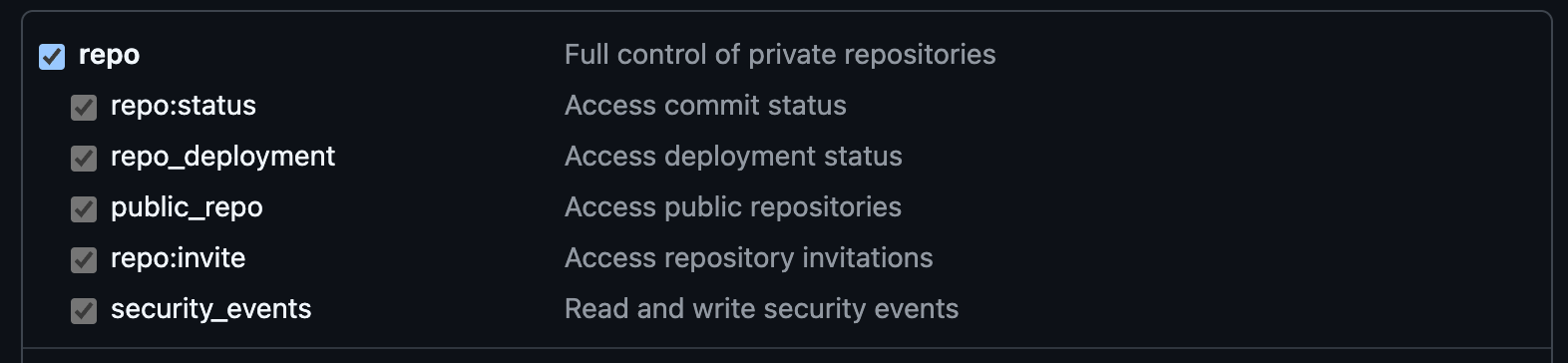
Pass PAT into Sourcebot
Next, provide the PAT via a token which is referenced in the
token field in the connection config object.The most common mechanism of doing this is defining an environment variable that holds the PAT:Connecting to a custom GitHub host
To connect to a GitHub host other thangithub.com, provide the url property to your config:
Schema reference
Reference
Reference